Liberté! Publicis ditches Lotus Notes

Back in July of 2013, I wrote about Publicis moving from IBM Notes to Exchange. Now, seven months later, it appears that the holding company is starting the migration.

It’s official: Publicis Groupe is ditching Lotus Notes. The long ad agency email nightmare is over.

The holding company’s staffers collectively sighed in relief this week when they heard news it is switching to Microsoft Outlook for its email needs instead.

“This is quite possibly the greatest day for employees in their history of working for Publicis,” said an exec at one of its global media agencies.

“I was brought to tears with joy,” added another.

More >

Connect 2014: Some Additional Highlights

Some highlights/announcement from Connect 2014:

IBM will consolidate the collaboration applications under one name, “Connections.” Example, Sametime will be rebranded Connections Chat (the instant messaging portion) and Connections Meetings (the meetings portion). Based on what I heard from the Product Managers in this area during “Ask the Product Managers,” it will be some time before they start using the new branding. It will take you and I much longer.

From PCWorld, comes this:

This means that the Connections bundle will include the Notes/Domino email platform, Docs office productivity apps and Sametime tools for IM, audio/video communications and Web meetings.

As those products get updated this year, they will be rebranded with the Connections name and offered as part that suite, whose core ESN software lets users create employee profiles, blogs, wikis, discussion forums and the like, as well as share, co-edit and comment on files and documents.

“Those products work together today. They’re fully integrated, but now the branding will provide clarity and focus and highlight all these integrated capabilities,” said Kramer Reeves, IBM Messaging and Collaboration Solutions director.

Consolidating these integrated products under a single brand umbrella will help IBM show prospective customers what it has to offer against competing suites like Microsoft’s Office 365 and Google’s Apps, as well as against vendors with narrower offerings, like Box and Dropbox in cloud storage and Jive Software in ESN.

More >

 For Connections, the following were announced:

  • File Sync which lets you synchronize files between your Connections Files repository, your desktop, and your mobile devices. You can pick and choose which files you would like to sync and differential sync is automatic to save bandwidth and time. File Sync with mobile devices is available today in SmartCloud. This is very much needed and will keep users in Connections instead of using competing products. It received a rousing round of approval from the delegates in the OGS.
  • Coming in Connections 4.5 IFR2, Ephox EditLive. A demo can be seen here, along with additional information.
  • Focus on user engagement. You’ll be able to personalize your activity stream and navigation bar and filter for content that is most important to you right now based on what you’re working on.
  • Search your activity stream, set up your real-time notification center and mark favorite content.
  • File galleries in Communities where you can preview files before choosing to download them and where you can manage, organize and share files visually.
  • Community folders which can be shared onto the overview page and browsed
  • @mentions everywhere
  • Secure external file sharing from a single internal instance of Connections installed on premises. External people will see only the information they were given access to, they won’t see public profiles and public communities. (Secure external file sharing is a feature of SmartCloud Connections today)

Coming in Traveler this year:

  • Ability to sync the trash folder with the server
  • Response indicators in inbox (reply and forward icons)
  • Sending S/MIME encrypted mail
  • Sametime awareness in the inbox
  • Integration with Connections services (Files, Communities, Activities)
  • Enhanced Support on Windows Phone for Calendaring, ToDos
  • DLP enhancements
  • Certificate-based authentication
  • New native Notes Traveler for iOS which allows cross-app integration and more features
  • Redesigned Android Traveler app

Coming in Sametime (oops, I mean Connections Chat, Connections Meetings):

  • Implementing additional on-premises Sametime 9 functionality in SmartCloud
  • Sharepoint 2013 integration
  • Chat logging for persistent chat rooms
  • More continuous video streams, video recording, optimized Citrix VDI support, content sharing with video, intelligent cascading MCUs
  • Mapping meeting management features to Connections
  • Integration with IBM Docs
  • Mobile API’s
  • Windows phone and tablet support
  • Ability to receive incoming calls via the mobile softphone

Of course, MailNext was announced. Screen shots and my thoughts can be found here.

Connect 2014: Domino Onboarding Manager

A feature in an imminent release of Domino was kinda/sorta announced at the Opening General Session. It was at the “What’s New in Domino” session where more information was shared. However, slides are not available for that session on the Connect site. Pity.

Not to worry, dear readers. You download have a rather small PDF of Domino Onboarding Manager right here (see below).

What is Domino OnBoarding Manager?

A tool which can migrate users/groups from Active Directory to Domino and emails/calendars/contacts from Exchange/Outlook to Domino/Notes.

FINALLY . . . we have a tool that will assist in the migration of Exchange/Outlook users to Notes/Domino. Perfect for those organizations that need to migrate recent acquisitions into their Domino environment. Perfect for anyone else that needs to perform a migration. Perfect for allaying the naysayers concerning the future of Notes and Domino.

Enjoy. DominoOnboardingManager presentation

Connect 2014: My Thoughts

Connect2014Banner


Unlike previous years, it has taken me longer to process what I saw and heard at Connect in order to have an opinion of the conference. Until now, when asked, “How was the conference?” I answered “good.” It was all I had.

Now, I have a better answer.

“Transitional.”

I believe that you have to be in denial to not get the overall direction IBM is taking with this conference and their products. Last year, it was, for the most part, the same as in previous years. It was if IBM was gently placing their toes in the seas of change.

Not so this year.

This year, unless you were “all in” with Connections, WebSphere, and Sametime, there was very little problem scheduling sessions to meet your needs. Oh, there were Notes/Domino/XPages sessions, but the first two were in, IMHO, in short supply. Development (that’s XPages )? Yeah, those were there, but hold no interest for an Administrator like myself. Except in AdminBlast where I learn how to turn off that feature. 🙂

I am very fortunate.

First, I was able to attend Connect with friend and colleague Barb Skedel. Together, we were able to split appropriate sessions, eliminating the whole “which session should I attend at this time” conundrum. Talk about stress relief.

Second, and most importantly, I accepted a full-time position with a company that is installing and implementing Connections, WebSphere, and Sametime. Unlike past years, where I was totally focused on Notes and Domino, this year I transitioned to every appropriate session for those areas. And, if it wasn’t for Barb, I would have been very upset at missing several key sessions. This was for me, a conference exactly like the ones in the past. Full of technical content on software that I use on a daily basis; Connections, Sametime, WebSphere, and Docs. Even as an administrator, you would find me in every “Customizing Connections” session that was available. And I understood exactly what the speakers were presenting and demoing. Isn’t that scary?

That should give you all you need to know about my present and future.

Notes and Domino? Of course, they are my foundation and in my future. However, this conference, in those areas, is no longer the “must attend” event if you’re an administrator. [Author disclaimer: I am not disparaging those attendees or presenters who came to Orlando and spent their time and money on those sessions. Honestly, take a look at the sessions again and tell me that Connect is for you]. Take another look at MailNext. While IBM keeps telling us that it runs on Domino, most, if not all, of the features coming in that product will require a Connections environment in order to take full advantage of those features. And if they don’t with the first iteration, they most certainly will with subsequent releases.

From my standpoint, that is a good thing. I want mail to integrate with Connections. Myself and my teammates have spent a lot of time getting Connections up and running and I want to leverage that investment as much as I can. Because if it integrates with Connections, then everyone will be using Connections, whether they know it or not.

Win-win.

I was not at all disappointed in this conference; Connect hits everything that I am now and will be. If I were a Domino administrator, I don’t think that this conference would be for me. In fact, I would never return. There isn’t enough content to make the conference worth the time or money (seeing my friends, that is another matter entirely. I would still “attend,” I would fly down on Thursday or Friday, stay the weekend, and fly home on Sunday night). Domino development? I really don’t know enough about Domino development to make a judgement.

You can sling all the “IBM says” and “IBM is committed to” statements you want about Notes and Domino. I firmly believe that Notes and Domino are a cash cow for IBM, and is treated as such:

Since the business unit can maintain profits with little maintenance or investment, a cash cow can also be used to describe a profitable but complacent company or business unit.

The place where IBM wants you to go, is exactly where I am going. And I feel fine.

One of the side benefits to attending Connections/Sametime/WebSphere/Doc sessions is that everyone was a new speaker to me. One of the side benefits of not attending Notes and Domino sessions was that I did not have to see the same speakers I’ve seen at more Lotuspheres/Connects that I care to admit. Oh, there is no doubt that they are very good, excellent, in fact, however I’d like to see some new people present. No, I’ll go even further; I’d like to see all new speakers in every Domino session (administrator and developer). Don’t you think that seeing the same people present at the same conference year in and year out is getting tiresome? Want to not have my thought come as a shock to the system? Try this: co-present with the person that will replace you. Then, the following year, take a seat in the audience while your protégé runs the show.

While I wait for that, I’ll just continue to support the regional User Group conferences to see new speakers and topics.

I’ve transitioned from a Notes/Domino Administrator to a Connections/WebSphere/Sametime/Docs Administrator and quasi-developer (you need to customize Connections, after all). Lotusphere transitioned from Notes and Domino to Connect and Connections, Sametime, WebSphere, and Docs. Connect 2014 was exactly what I expected and wanted from IBM.  Even in the labs, with the exception of the MailNext in theDesign Lab, I spent all of my other time with the Connections, Sametime, and Docs people. I didn’t even stop by the Notes/Domino pedestals. Even in the Product Showcase, most of my time was with vendors who are investing in and developing applications for Connections and Sametime.

Like I said, “transitional.”
Connect 2014: MailNext-Screenshots and Thoughts

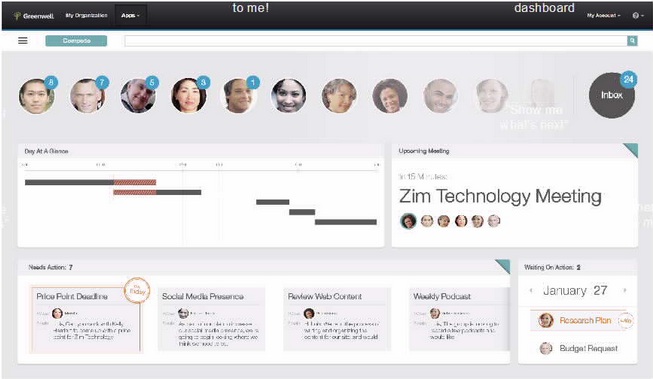
During the OGS at Connect 2014, IBM demonstrated the next iteration of, what can be described as, the next release of Notes. It’s called “MailNext.” While the OGS gave a fairly good overview of the interface, it was when I took the time to visit the Design Studio UX Lab that I received a much better view of MailNext.

The “home” page:

MailNext1


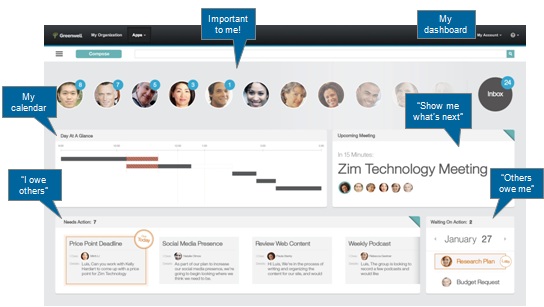
The pictures below the search bar are of people who you are interacting via e-mail. The floating numbers show you the number of messages from that individual. At a glance, you see everything you need for the day.

MailNext4


I think that one of the better features is in the lower right. There, it tells you who owes you something. For example, if you assigned a “To Do” or a task. Better, it also shows you that you are waiting for a reply from someone, where you asked for something. I think that this is a great tool for managing your peers and managers.

Looking at the interface, if you click on someone at the top of the screen, it pops up mini menus of things you can do with that person:

MailNext2


Some of the little pop up menu items are mail, calendar, chat, share.

MailNext3

As you have selected the individual, you see the interface change to be person (or “context”) sensitive. In the above screen shot, you see that you get a “what’s new” view, where you can view mail, mail threads from that person or that include that person. On the right, is a “team view,” where that person is included in some sort of project with you.

And, in the upper right, you see that you still haven’t read 26 messages in your Inbox.

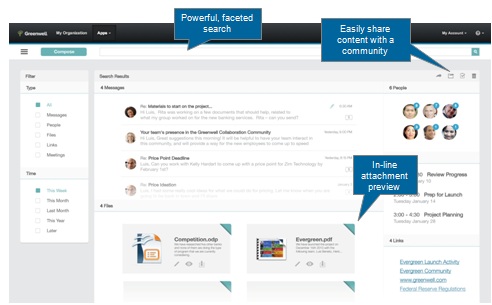
Finally, in what could be described as your traditional Inbox view, potential enhancements include in-line attachment preview, an option to share content with a Connections Community, and “powerful search.”

MailNext5


Initial thoughts: While I spent quite some time with a developer in the lab, I was getting the feeling that this interface isn’t totally fleshed out. IBM has some ideas on what they want it to do, however they were very curious as to what I thought some of the icons should mean/do. For example, if I were to hover over a person’s image, and get the mini menus, I expected that if I click on the envelope, a new message would be created, populated with that person’s e-mail address. Or, see all mail that I received from that person.

There were more questions from the developer along those lines: “What do you think <x> should do?” “What do you think <x> represents?” “What are your expectations of <x>?”

And, I discovered that only certain parts of the interface work. Click on something, like “Compose,” and nothing happens. That’s one way to make sure everyone that demo’s the software, from the OGS demo, to the breakout sessions, to the Design Lab, communicates the same message. It also showed my naivete toward demos; I thought it was a fully functional demo.

Next, I didn’t get the feeling that proposed delivery dates for MailNext will be met. To me, there is still a lot of work to be done. And there wasn’t any mention of what needs to be done to the back-end Domino server (other than upgrading it).

Finally, if most/all of your users are running the IBM Notes client, you better start thinking about the ramifications of most/all of your users running mail in a browser.

What do you think of MailNext and what you saw/heard at Connect (or on one of the streamed videos?)


IBM Redbooks Mobile App

RedbooksMobileApp

Features of the app include:

  • Read thousands of Redbooks publications, from classic Redbooks to the latest Solution Guides, Product Guides, Redguides, and more
  • Find Redbooks publications by those most recently published or updated, most popular, subject area, or publication type
  • Search within publications and create bookmarks
  • Save your favorite publications and organize them in convenient, customizable folders
  • Share what you’re reading through Facebook, Twitter, and email
  • Get the latest news from Redbooks, including announcements and listings of new residencies and workshops
  • Connect with Redbooks through social channels, from Facebook to Twitter and more
  • Link to the latest Redbooks blog posts and videos

More >

<insert some snarky comment about lack of IBM Notes/Domino Redbooks and the state of the wikis >

Free ICS Certification Tests at Connect14

One of the biggest draws at this event has always been the certification testing and prep labs. IBM is pleased to announce, for the very first time, that unlimited complimentary IBM Collaboration Solutions exams will be available for all registered attendees for the duration of the conference. All other Software Group exams will be available for 50% off the regular price.

As in previous years, testing will take place in the Lark room of the Swan Hotel.

More >

While that is pretty great news, the kicker is that there will be none of the pre-registration stuff as in year’s past. You show up, sign up, take your exam (although you do need to have created a profile in advance and also remember your user ID and password).

So, while at Connect 2014, in addition to the education, you can also get certified. For free.

InformationWeek: Amazon Again Beats IBM For CIA Cloud Contract

“As a threshold matter, IBM lacked any chance of winning a competition with AWS for this C2S contract,” the ruling said, and therefore it lacked standing to claim prejudice in the way the contract had been awarded. The GAO failed to assess whether IBM had the standing to file the protest that it did, said the ruling.

The court also objected to GAO failing to spot maneuvering by IBM’s lawyers. “The GAO failed to address the way in which IBM manipulated its pricing to create a bid protest issue,” it said. IBM “drastically departed from the approach followed in its initial proposal when it came to submitting its final proposal revision” for one set of requirements, known as Scenario 5. IBM had closely questioned the CIA on what it expected from the Scenario 5 requirements. By revising its final bid on Scenario 5, it gained the position to “argue that the agency did not evaluate Scenario 5 prices on a common basis. IBM was the only offeror who appeared to ‘misunderstand’ the Scenario 5 pricing requirements,” the court said.

More >

An interesting look into business practices at IBM, when $600M is at stake.

Open MIc Webcast: All-in-one Admin Tool for Agent-based Troubleshooting & Problem Solving – 13 November 2013

Well, kids, it’s time for another webcast.

Join IBM’s Rene Jenkins [13 November, 11:00 EST], along with several other members of the IBM Notes & Domino teams as they discuss the All-in-one Admin Tool for agent-based troubleshooting & problem solving. After a presentation attendees will be given an opportunity to ask questions. Throughout the event, attendees will also be encouraged to comment or ask questions through our SmartCloud meeting web chat. Join us for this interactive, educational, lively session.

More >

Open Mic Webcast: What’s New in IBM Notes Traveler Since 9.0 Shipped

Come hear more about the new IBM Notes Traveler features that have been released since 9.0 shipped earlier this year. New features include Attachment Security, Out of Office, Streaming, Android Client Improvements, Device OS Currency, and more.

After a presentation attendees will be given an opportunity to ask questions. Throughout the event, attendees will also be encouraged to comment or ask questions through our SmartCloud meeting web chat. Join us for this interactive, educational, lively session.

Topic: What’s New in IBM Notes Traveler Since 9.0 Shipped

Day: Wednesday, November 6, 2013
Time: 11:00 AM EST (16:00 UTC/GMT, UTC-5 hours) for 60 minutes

More >

Please note, this is happening tomorrow, 6 November.